
Our database tracks a wide variety of information and data types including:
- Metadata, which is any non-analytical information that may be associated with feedstocks (e.g., harvest/collection locations and dates, sample identification labels, genetic variability, agricultural management practices, contact information, etc. ).
- Operational data, which includes equipment and processing methods information. Operational data tracks all physical or chemical changes that a feedstock may have undergone, generating a traceable sample hierarchy.
- Analytical data which includes all analysis data and analytical methods used to determine feedstock characteristics (e.g., physical, chemical, conversion performance, operational/processing engineering performance, mechanical properties, and microbial characteristics).
- The Bioenergy Feedstock Library is a secure location to track your samples and store your data. Your data can be made public for all users to view or kept private until ready for release.
- A unique system that allows you to compare your data with other data sets across the nation and in some cases, internationally.
- The flexibility of the BFL allows users to load their own analytical procedures which then you may compare data sets with other analytical procedures.
- A user can have publications seen and be cited. Also, they have access to other publications and the data sets associated with them.
- Collaborate with other teams from academia, industry and government research entities on a global level.
That’s easy! Get started on our website by visiting the Login Page, clicking on the Register tab, and filling out the form as shown here:
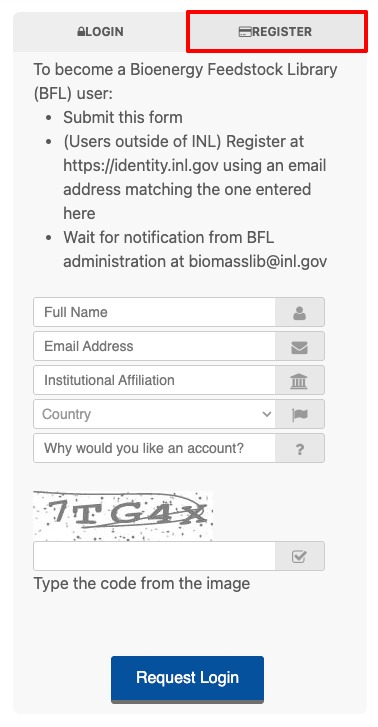
Users outside of Idaho National Laboratory will also need to create an account on the INL identification portal at identity.inl.gov using the same Email address used in the registration form.
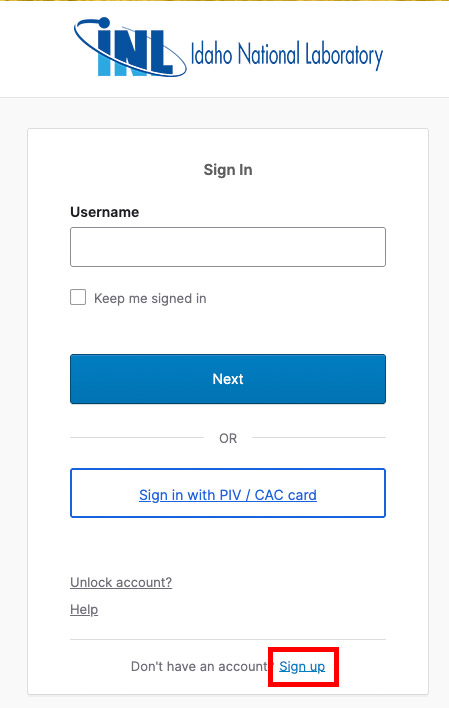
An administrator will review your request and then notify you at the Email address provided when your account has been activated.
All samples and data in the BFL database are organized within “Projects”. BFL security is tracked at a Project level. If a Project is marked “sensitive”, then only Project members can access the samples and data. If a Project is marked as “public” then all other BFL users can view the samples, data, and other Project products. BFL users can become members of existing BFL Projects, with permission from the Project owners, or have their own Projects created to start tracking and managing samples today. Please contact our BFL Team if you are interested in creating a new Project in the BFL.
Once you have a user account, you will be able to search the sample database by feedstock, projects, analysis types, and more. For example, want to know about ash content? Start your search in our analysis data by selecting one or more ash-based analyses and then select your feedstocks of interest from there. The search capabilities are endless! The BFL also allows you to export all information from your searches straight into a spreadsheet file. Please reach out to our BFL Team with any questions on searching the database.
A Global Unique Identifier (GUID) is a 32-digit hexadecimal number. Our Bioenergy Feedstock Library assigns one of these (in the form of 920df2e3-3ce3-4a30-82ac-52ecc7bf797a) to each sample in our database. GUIDs are the basis of sample tracking in the BFL and are used to associate metadata and analytical data to samples. Projects can assign other unique labeling schemas to samples for project level sample tracking through the metadata fields as desired.
Hierarchy is the “family tree” so to speak of each sample. The Bioenergy Feedstock Library has a unique capability of tracking and visualizing the family heritage of a sample through the Hierarchy tool. Hierarchies can be created based on physical changes a sample may have undergone prior to analysis or hierarchical families with samples representing a field, plots within fields, and then physical samples harvested from the plots. The Hierarchy tool is a fantastic visual aid helping users understand the full process and sample background in one display.
The BFL Reference Materials represent industrially relevant, real-world biomass samples freely available to the research community in gram to kilogram quantities. Each of these materials has extensive characterization data provided as a specification data sheet with the material. Information on our currently available Reference Materials can be found on our Biomass Info page. Please visit our Request Biomass page to request a Reference Material.
Click the Request Biomass button in the navigation. From there, you may request the feedstocks of interest by filling out a short form. Please look at the Biomass Info page to see what samples are currently available. If there are other biomass types that you are interested in, we also try to provide shareable samples from other projects from the BFL. Please contact our BFL Sample Manager, Marnie Cortez ([email protected]), for more information on other potential available samples.
Data Visualization is a very powerful tool that visualizes biomass characterization data from sample data stored in the BFL database. This tool provides high-level statistical analysis and aggregate information for key feedstock properties.
The Analysis Summary is a fantastic way to see all available data types and feedstocks in one spot. This tool shows what types of feedstocks and associated data are currently publicly available in the BFL database.
The Blend Prediction Tool is a tool that allows users to predict blend characteristics of feedstock resources based on currently available data for the resources of interest. You simply pick the types of feedstocks and what percentages you may use for your blend, and this Tool pulls analysis information from the library to “predict” the types of characteristics for your newly created blend!
Please contact our friendly and helpful BFL Team and they will gladly walk you through the process. Once it is determined what type of data and tracking you are interested in, we will walk you through the process of uploading sample information, managing your project and data, and accessing your data.
Please use the following text for citations:
U.S. Department of Energy, Idaho National Laboratory. “Bioenergy Feedstock Library.” bioenergylibrary.inl.gov (accessed, Date)